Log in to the CloudPe Dashboard
Access the CloudPe dashboard using your credentials.
Navigate to the Virtual Machines List
Locate the list of virtual machines available in your account.
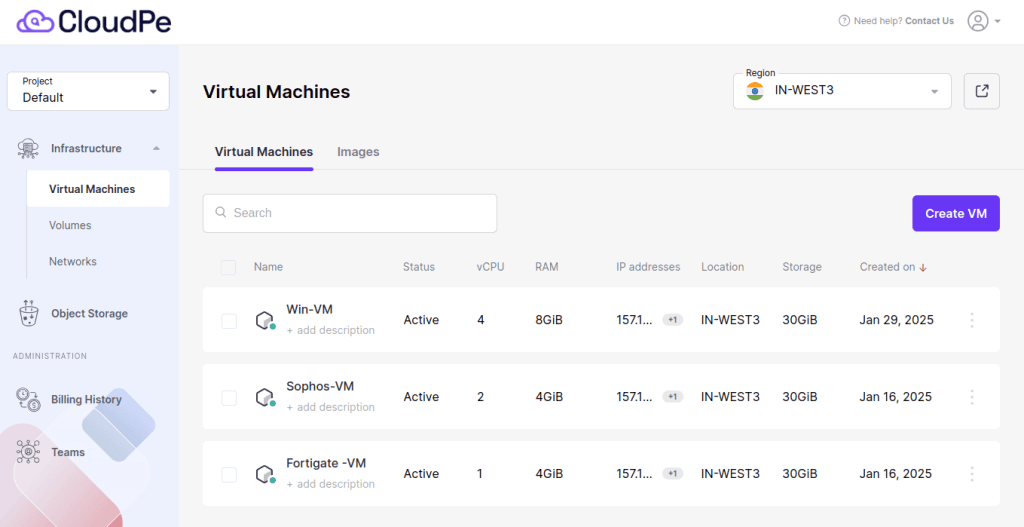
Identify and select the Windows VM for which you need to reset the password.
⚠️ Prerequisite: The VM must be in a Running (powered on) state for the password reset to work. If your VM is stopped, start it first before proceeding.
Click on the ‘Action’ dropdown menu. The Action dropdown is accessible from the VM detail page.
In the dropdown, find and select the ‘Set Password’ option.

Enter a Strong Password for your VM.

Click ‘Set’ to apply the new password. This will reset the password for the Administrator account on your Windows VM.
Use the updated credentials to access your VM securely.
Strong Password Guidelines:
CloudPe enforces the following password requirements. Your new password will be rejected if it does not meet these criteria:
- Minimum Length: At least 12–16 characters.
- Combination of Characters: Include uppercase and lowercase letters, numbers, and special symbols (@, #, $, etc.).
- Avoid Common Words: Do not use easily guessable words like ‘password123’ or your name.
- No Reuse: Avoid reusing old passwords.
By following these steps and best practices, you can ensure the security of your VM and prevent unauthorised access.
Post-Reset Login Verification:
After resetting your VM password, it is important to verify that the new credentials are working correctly.
For Windows VMs:
⚠️ Before connecting via RDP, ensure that port 3389 (RDP) is allowed in your CloudPe Security Group. If port 3389 is blocked, the RDP connection will fail even after a successful password reset.
- Open a new RDP (Remote Desktop Protocol) connection to the VM’s IP address.
- Enter the username and new password to verify access.
Troubleshooting:
RDP connection is refused after password reset
If you reset the password successfully but cannot connect via RDP, check the following:
- Firewall / Security Group: Make sure port 3389 (TCP) is open for your IP address in CloudPe’s Security Group settings.
- VM State: Confirm the VM is still in Running state after the reset.
- Username: Ensure you are logging in as Administrator.